

User experience scorecards are a vital way to communicate usability metrics in a business sense. They allow teams to quantify the user experience and track changes over time.
Collecting consistent and standardized metrics allows organizations to better understand the current user experience of websites, software, and apps (Sauro, 2018).
My most recent round of usability testing was conducted on a prototype for a records management product that has never had user experience research performed. So our priority here was to establish some benchmarks. To do this I tested the prototype against three metrics: success rate, ease of use, and usability. I utilized industry-recognized scoring methods: success criteria scoring (SCS), single ease question (SEQ), and the usability metric for user experience lite (UMUX-lite).
In the case of UMUX-lite, it is common to implement a regression model to transform the scores into a more widely known system usability scale, or SUS score.
Metrics
Success Rate
To quantify the success rate, I used success criteria scoring. We broke the test down into a series of steps and scored user performance on each of the steps. Participants could receive 1 of 3 scores. If they completed the step without any issue, they received a 1. If they didn’t need help, but they struggled, they received a 0. If they failed in the attempt or I had to step in to help them, they received a -1.
This test was broken into 31 individual steps. Multiplied by 8 participants, the success criteria scorecard has 248 scoring opportunities.
SCS Differential (Sum minus Count)
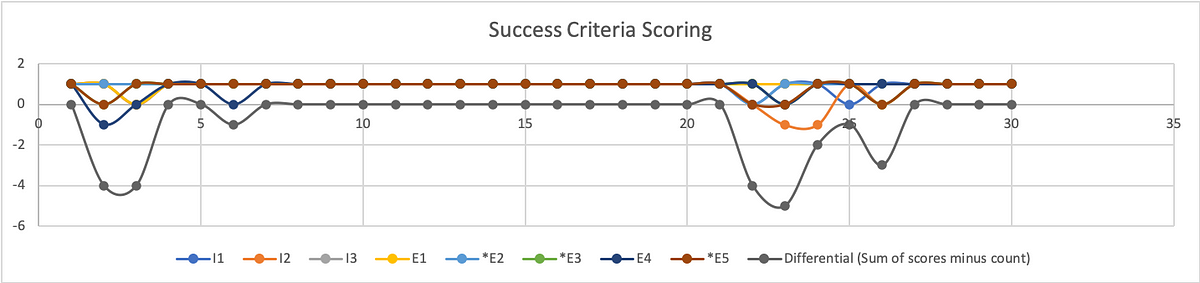
To better understand where users struggled, we calculate the differential (sum of scores minus count of scores) on a given step.
From the SCS chart above we can see exactly where test participants struggled, and where they had no trouble at all. This chart shows individual results with the differential underneath. As you may note, the best result a participant could receive is a 1, while the best result from the differential is a 0.
Broken Down by Task

To calculate the success rate, we turn to Jakob Nielsen, (2001). Get the sum of your scores. Success (S)= 1; Pass (P) = 0; Fail (F) = -1
Filtering the data by task, our formula for calculating the success rate is:
(S+(P*0.5))/O where O is equivalent to the number of possible scores.
For task 1 the resulting formula looks like: =(25+(6*0.5))/32 = 88%
Because out of 32 scoring opportunities, 25 were successful and 6 were passing.
Of course, participants had no issue with a substantial portion of our prototype. This was a constraint of our test in that our prototype was intended to test the functions and features of a report writing system without actually allowing them to fill out the report. Rather, we simply let them click a form field that would populate data in the relevant fields on that screen, then simply click the button necessary to proceed to the next screen.
The formula for success rate on task 2 is: =(155+(5*0.5))/160 = 98%
Our metrics do reveal an issue related to using the stepper for navigation. The scores participants received during these steps are less indicative of a specific issue and more related to the fact that this is a new UI pattern that participants were unfamiliar with using. Similar to any new UI pattern introduced in the context of software and applications, the feature lacks predictability. Although the feedback from participants and relative scores from the other metrics suggest that the feature is sufficiently easy and usable, we don’t want to express confidence in these findings yet.
As with any new feature or functionality, it is highly recommended that more extensive testing be performed to increase the sample size and generate the kind of statistical significance that we can use to express confidence in our analysis.
The formula for success rate on task 4 is: = (23+(7*0.5))/32 = 83%
Although participants found submitting the report to be the easiest of the tasks. It was only one step. On that single step, half of the participants struggled (scored 0) to find the Done button.
The formula for success rate on task 5 is: =(4+(4*0.5))/8 = 75%
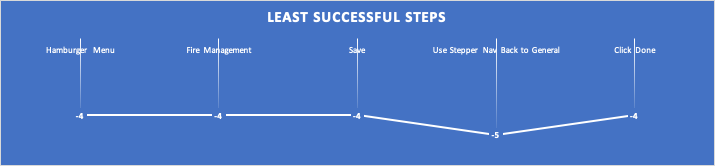
Filtering all the steps for those in which participants had the least success (differential score of -4 to -5), we are left with five specific steps that outline opportunity areas to prioritize improvement for future iterations before release.
The formula to calculate overall success rate is: =(223+(22*0.5))/248 = 94%
Ease of Use
To quantify ease of use, we opted for the single ease question (SEQ). After 3/5 tasks (Begin incident report, Complete report, Submit report) we asked users on a scale of 0–6, with 0 being very difficult and 6 being very easy, how difficult or easy this task was to complete. Since we have no personal benchmark from previous usability tests with which to compare our scores to, we reference the historical average of 5.5 (Sauro, 2012)
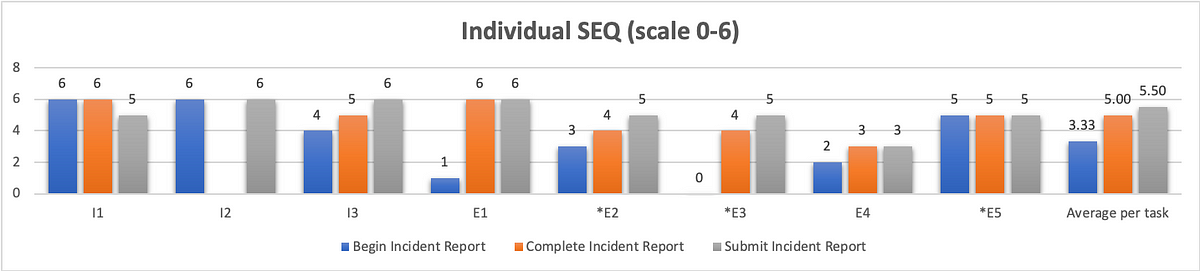
As we can see from the chart above, our first task scored the worst in terms of ease of use with an average of 3.33. Although participants struggled just as much with completing and submitting the report, they did not view these aspects of the system to be as difficult. Completing a report received an average SEQ score of 5, and submitting the report received the historical average of 5.5.
Usability
You can’t adequately conduct a usability test unless you are testing for usability. There are a variety of industry-recognized usability scoring methods to select from, but the standard is still the System Usability Scale. This is a 10-question survey given after a test and the responses are then aggregated into a SUS score. The average SUS score from years of historical data is 68 (Sauro, 2013).
However, a 10-question survey is a little much to expect good feedback from participants at the end of a usability test. Instead, researchers have developed the Usability Metric for User Experience (UMUX). This is a 5-question survey developed as a more efficient means of generating a similar result. Yet, researchers at IBM went even further, researching the efficacy of the 5-question survey (Lewis, Utesch, & Maher, 2013). What they determined is that they can garner a similar feedback score from simply asking participants to rate their level of agreement with 2 positively framed UMUX statements:
This system’s capabilities meet my requirements.
This system is easy to use.
UMUX-lite 7pt. scale linear regression to SUS
If you ask participants to rate their level of agreement to these two statements on a 7pt scale, with 0 being completely disagreed and 6 being in complete agreement, you can then use a regression formula to transform these scores into a SUS score.
You can find these formulas in the Lewis et al. paper, but I first came across them on Quora, from Otto Ruettinger, Head of Product, Jira Projects at Atlassian (Ruettinger, 2018). In the post, he provided the formulas he uses in Excel to transform raw UMUX-lite scores to serviceable SUS scores.
In its raw format the calculation would be:
UMUX-L = ((a. /7) + (b. / 7))/2 x 100
Which gives a range of 14 to 100.
And the SUS regression transform calculation would be:
SUS Score = 0.65 ∗ ((a. + b. − 2) ∗ (100/12))+22.9
Converting 5pt. to 7pt. scale for linear regression to SUS
When I showed my conversions to the other user researcher on my team, she noticed that I was using UMUX-lite on a 5pt. scale, and that my formula would have to be altered from above.
Instead of:
UMUX-L = ((a. /7) + (b. / 7))/2 x 100
it needed to be:
UMUX-L = ((a. /5) + (b. / 5))/2 x 100
As a result, I wasn’t confident in using the SUS regression to generate a SUS score.
Then I found an article on converting Likert scales(IBM Support, 2020). So a 5pt. to a 7pt. scale and vice versa.
What we end up with is: 0=0; 1=2.5; 2=4; 3=5.5; 4=7.

With my scale transformed, I was able to implement the SUS regression formula and obtain the SUS score.
Putting it all together
This is the wonk stuff that nobody but other user researchers likely care about. What your product, dev team, and executives want to see is an “insights forward” summary. You can put this all together in a UX scorecard so that stakeholders can get a quick high-level overview of your analysis concerning your given metrics. These scorecards can help you settle debates, and get the whole team on board by clearly identifying priorities for your next sprint.

Works Cited
IBM Support. (2020, 4 16). Transforming different Likert scales to a common scale. Retrieved from IBM Support: https://www.ibm.com/support/pages/transforming-different-likert-scales-common-scale
Sauro, J. (2012, 10 30). 10 Things to Know about the Single Ease Question (SEQ). Retrieved from MeasuringU: https://measuringu.com/seq10/
Sauro, J. (2018, 19 23). Building a UX Metrics Scorecard. Retrieved from MeasuringU: https://measuringu.com/ux-scorecard/
Lewis, J. R., Utesch, B. S., & Maher, D. E. (2013). UMUX-LITE — When there’s no time for the SUS. CHI 2013: Changing Perspectives, Paris, France, 2099–2102.
Nielsen, J. (2001, 2 17). Success Rate: The Simplest Usability Metric. Retrieved from NN/g Nielsen Norman Group: https://www.nngroup.com/articles/success-rate-the-simplest-usability-metric/
Ruettinger, O. (2018, 6 5). How is UMUX-L calculated in your company? Retrieved from Quora: https://www.quora.com/How-is-UMUX-L-calculated-in-your-company
Sauro, J. (2013, 6 18). 10 Things to Know About the System Usability Scale (SUS). Retrieved from MeasuringU: https://measuringu.com/10-things-sus/

 Matt Garvin, MSI
Leave a comment